I keep one page that exercises every block this generator renders. It's half showcase, half regression test: if something here looks wrong after I touch the build, I broke it. The gentle walkthrough lives in its own post — this is the exhaustive version. Read what you need and delete the file once you write your own.
text, the boring parts#
Body copy is plain prose. You get bold, italic, struck through,
inserted, inline code, and sub/superscripts like H2O and x2. Smart
symbols fix the typography for you: type (c) (tm) +/- --> =/= 1/2
and they render as © ™ ± → ≠ ½.
Links come in two flavours: an internal one and an external one — the external link grows an arrow and opens in a new tab on its own, no markup needed. Abbreviations get a dotted underline: hover HTML to see it expanded.
Block quotes read like a quoted patch note — a thin rule on the left, dimmed text, no drama.
Lists nest the way you'd expect:
- top level
- nested, with a dash marker
- and another one
- back out again 1. ordered 2. and counted
Task lists track a target without a checkbox library:
- dump the binary
- find the check
- beat the check
Definition lists, for when a glossary is the clearest format:
- tcache
- per-thread cache of freed chunks; the hottest path in glibc
malloc. - safe-linking
- the XOR mangling that made tcache
nextoverwrites need a heap leak first.
code listings#
The thing a blog like this lives or dies on. Fences become listings with a filename, a language tag, line numbers, and a copy button. Click any line number to deep-link it — the URL updates and the line lights up.
Highlighting is greyscale — weight and inverse video, never hue. The same lexer machinery handles whatever you point it at:
Put {title="x.c" hl_lines="3 4"} after the language to set the filename and
highlight lines. A fence with no language is plain text — handy for a stack
diagram, where you want the monospace grid but no syntax guesses.
hexdumps and diffs#
A hexdump fence turns its content into an aligned dump — offset, bytes, ascii.
By default it dumps the UTF-8 bytes of the text:
00000000  73 65 67 66 61 75 6c 74  7b 68 33 78 64 75 6d 70  |segfault{h3xdump|
00000010  5f 34 6c 6c 5f 74 68 33  5f 74 68 31 6e 67 73 7d  |_4ll_th3_th1ngs}|
Pass {from=hex} to dump a hex string instead, and {hl="0-3"} to call out byte
offsets — here, the ELF magic:
00000000 7f 45 4c 46 02 01 01 00 00 00 00 00 00 00 00 00 |.ELF............|
Diffs are just a ```diff fence. Pygments greys the deletions and brightens
the insertions — no red, no green — and each changed line gets a gutter bar:
Wide listings — long disassembly, a 16-byte hexdump on a narrow screen — scroll sideways with a fade on the right edge so you know there's more.
know your target#
Every pwn writeup opens with the same question, so there's a block for it: a
checksec-style panel, facts on one side, mitigations as a greyscale checklist
on the other.
- arch
- amd64-64-little
- libc
- 2.35 (Ubuntu glibc 2.35-0ubuntu3)
- category
- pwn · 487 pts
- NXon
- PIEon
- RELROfull
- canaryoff
- ASLRon
It's key: value lines inside a target fence:
Anything that reads like on / off / full / partial / none becomes a
mitigation row with a ✓ or ✗; everything else is a plain fact; file: (or
binary:) becomes the title. No red, no green: the enabled mitigations sit back
in grey, and the disabled ones — the way in — stay bright.
admonitions#
Callouts for the aside that would otherwise wreck a paragraph. The first word picks the style:
note
The neutral aside. The one you'll reach for most.
tip
A shortcut, or a cleaner way to do the thing you just did the hard way.
footgun
The detail that desyncs your disassembly or aborts your exploit three instructions later.
danger
Reserved for the genuinely destructive — the command you shouldn't paste.
Source is !!! type "title" and a four-space-indented body:
spoilers and folds#
CTF writeups have a spoiler problem — public walkthrough, hidden flag. A spoiler
block folds the answer away until clicked, and it's a plain <details>, so it
still hides with JavaScript switched off.
the flag
segfault{r3nd3r1ng_4ll_th3_th1ngs} — and the one-gadget that dropped it
stays right here, out of sight until you decide you want it.
Use ??? for any fold and ???+ to start it open — good for a long appendix you
want present but collapsed by default:
expanded on load
Same machinery, open by default. The reader can still fold it away.
tables#
| technique | primitive it gives you | mitigation that hurts |
|---|---|---|
| tcache poisoning | near-arbitrary write | safe-linking, glibc ≥ 2.32 |
| ret2libc | call any libc function | ASLR, PIE |
| format string | read/write where you point | FORTIFY, -Wformat |
Rows dim on hover. The line-number gutter of a code listing pointedly does not, even in light mode — that was a real bug once.
math#
Crypto challenges and the occasional bit of analysis need real notation. Write LaTeX between dollar signs — inline like — or as a display block:
It renders to MathML at build time: the browser draws it natively, so there's
no math library, no extra web font, and no JavaScript shipped for it. ($5 and
$10 are left alone — the parser isn't that naive.)
diagrams and screenshots#
Drop in an image and it becomes a figure — lazy-loaded, with its dimensions baked in at build time so the page doesn't reflow as it loads, and click-to-zoom into a lightbox. The alt text becomes the caption.
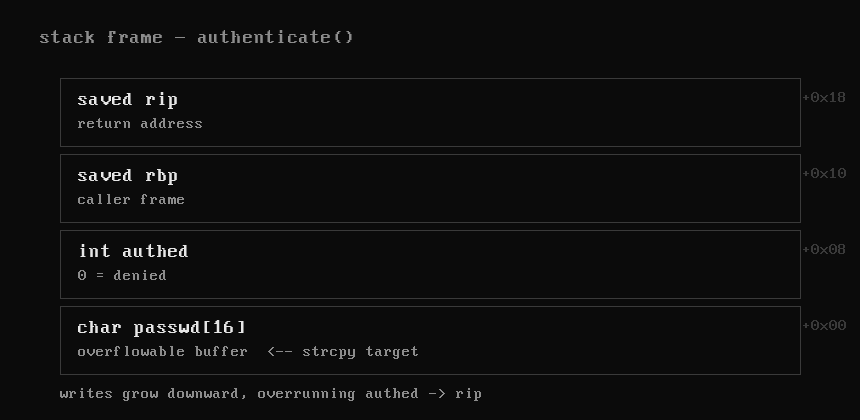
Images live under static/ in the project root; static/img/stack.png is served
at /img/stack.png.
terminal recordings#
For a pwn demo or a tool run, embed an asciinema recording. It's rendered to a self-contained animated SVG at build time — greyscaled to match the site, no runtime player, no JavaScript, no CDN:
Record with asciinema rec demo.cast, drop the file under static/casts/, and
point a cast fence at its path. (This is the one feature that needs a build-time
tool — npm install pulls in svg-term; without it the block degrades to a
note instead of breaking the build.)
footnotes#
For the tangent that belongs at the bottom, not mid-sentence.1 They link both ways, so a reader can dip into the aside and climb back out without losing their place.
everything that isn't a block#
Some features aren't markup — they're the page around the words:
- the contents list pinned to the right tracks your scroll (you've watched it move down as you read); on a phone it folds inline at the top.
- the hairline along the top of the window is a reading-progress bar.
- posts that share a tag grow a related list at the foot — scroll down, this one is wired to the tour post.
- hit
/for fuzzy search over every title and body,j/kto walk the index,tfor light mode,?for the full key map. - every post gets a generated monochrome share card, an RSS entry, and a clean print layout — try Ctrl-P and watch the chrome drop away and the code go ink-on-paper.
None of it is load-bearing. Kill JavaScript and this is still a clean, readable document, which is the entire point.
one short tail#
A deliberately tiny last section — because a contents list has to be able to reach the bottom entry, and that took a fix to get right.
-
Like this one. The number is auto-assigned and back-links to exactly where you were reading. ↩